

Export Block Textures for Minecraft, Tiled, and Any Voxel Engine
Paint a texture once, then export it the way each target expects - Minecraft Java and Bedrock packs, Tiled tilesets, or universal PNG and atlas files that drop straight into Godot, Unity, ThreeJS, or Babylon.

Every engine wants block textures in a slightly different shape. Minecraft expects a resource pack with a specific folder layout and metadata. A 2D project built on Tiled wants a tileset file. Godot, Unity, ThreeJS, and Babylon are happy with plain image files you import yourself. The point of Hexcalibur is that you paint the texture once, then export it in whichever of those shapes you need - without redrawing anything or rearranging files by hand.
This post covers what Hexcalibur exports today and which option to reach for depending on where the texture is headed.
Paint once, export in the layout each target expects
A single texture in Hexcalibur is engine-agnostic. The pixels are the pixels. What changes between targets is the packaging - the file format, the folder structure, and the metadata that tells an engine how to read the image. Hexcalibur's export step handles that packaging for you, so the same canvas can become a Minecraft pack one minute and a sprite sheet the next.
There are four kinds of export to know about: ready-made engine packs, tileset files, universal image exports, and the .hexc pack file for backups and sharing.
Ready-made packs: Minecraft Java and Bedrock
If you are making textures for Minecraft, Hexcalibur builds the whole pack, not just the image.
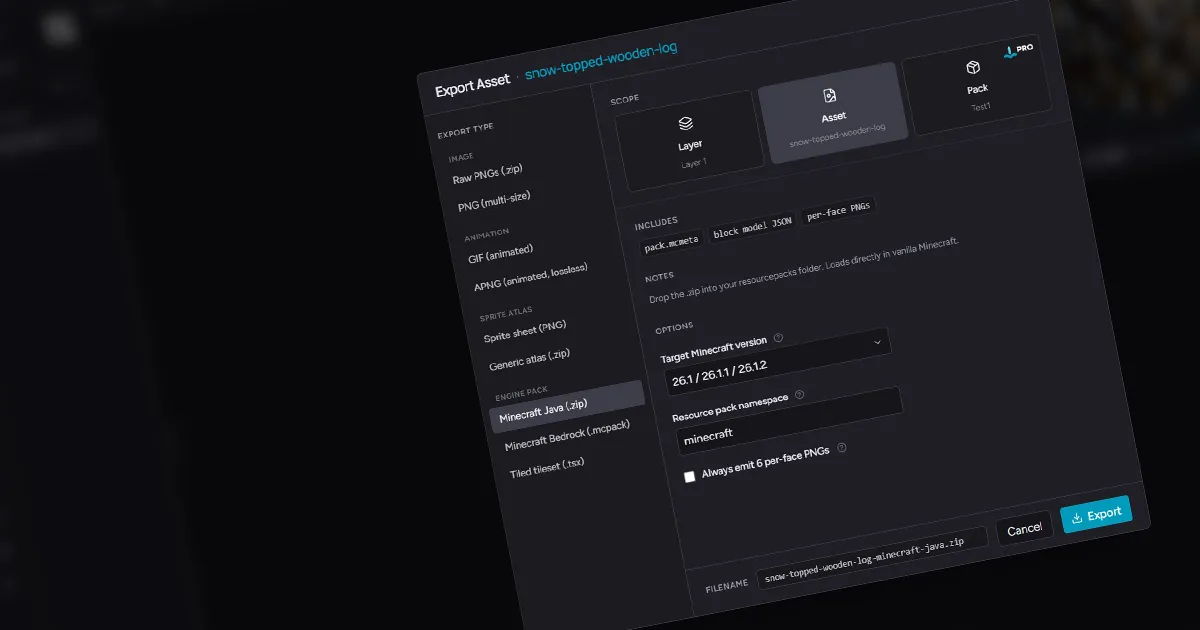
- Minecraft Java (.zip) produces a complete resource pack: the correct folder structure, the pack metadata, and your textures in place. Drop the
.zipinto.minecraft/resourcepacksand enable it in game. For a full walkthrough of drawing and installing one, see how to make Minecraft block textures. - Minecraft Bedrock (.mcpack) produces a Bedrock-format pack with its manifest and texture definitions, ready to import on Bedrock Edition.
Both handle the fiddly metadata that usually trips people up, so you spend your time painting instead of hand-editing JSON.
Tilemaps: Tiled tileset
For 2D and isometric projects built around the Tiled map editor, the Tiled tileset (.tsx) export gives you a tileset file plus its image, ready to load as a map's tile palette. If the export includes a tilemap you built in Hexcalibur, it also writes a ready-to-open .tmx map file alongside the tileset. This is the path when your "blocks" are really tiles in a 2D world rather than faces on a 3D cube.
Universal exports: Godot, Unity, ThreeJS, Babylon, and anything else
Most engines do not need a special pack format - they just need clean image files you import into your own project. Hexcalibur covers this with format exports that work anywhere:
- Raw PNGs (.zip) gives you each texture as an individual PNG in a zip. This is the simplest path into Godot, Unity, or any engine where you assign textures to materials yourself.
- PNG (multi-size) exports your texture at several resolutions at once, useful when you want both a crisp source and downscaled variants.
- Sprite sheet (PNG) packs animation frames or textures into a single sheet, the classic input for 2D frameworks and shader-based animation.
- Generic atlas (.zip) produces a packed atlas image with a TexturePacker-style JSON manifest of frame coordinates, the format loaders in ThreeJS, Babylon, and a wide range of engines and libraries already understand.
In practice: for a 3D voxel game in Godot or Unity, reach for Raw PNGs and import them as you would any texture. For a web game in ThreeJS or Babylon, the generic atlas keeps everything in one file with the coordinates loaders expect.
The pack file: back up or share the whole pack
One export lives outside the engine dialog: Export Pack File (.hexc) in the File menu. It writes your entire pack - every texture, layer, palette, and animation - into a single lossless .hexc file that Hexcalibur can open again on any machine. It is the right format for backups, for moving work between computers, or for handing a pack to a collaborator, and it is free on every plan.
Engine exports are one-way snapshots of the pixels; the .hexc file is the work itself.
What about animated block textures?
Hexcalibur has a full animation timeline, and animated textures export too. Animated GIF is available on the free plan. Lossless APNG, animated sprite sheets, and the animated formats inside the Minecraft packs are part of Pro. For static textures, every export format is open regardless of plan.
Which export should I use?
| Where it is going | Export to use |
|---|---|
| Minecraft Java Edition | Minecraft Java (.zip) |
| Minecraft Bedrock Edition | Minecraft Bedrock (.mcpack) |
| Tiled map editor | Tiled tileset (.tsx) |
| Godot or Unity | Raw PNGs (.zip) |
| ThreeJS or Babylon | Sprite sheet (PNG) or Generic atlas (.zip) |
| A backup, another computer, or a collaborator | Pack file (.hexc), from the File menu |
Frequently asked questions
Can Hexcalibur export to Godot or Unity?
There is no one-click Godot or Unity pack, because those engines do not need one. Export Raw PNGs (or a sprite sheet for animations) and import the images into your project the normal way. The files are standard PNGs, so they work in any engine.
Does Hexcalibur make a real Minecraft resource pack?
Yes. The Minecraft Java export builds a complete .zip resource pack with the correct folders and metadata, and the Bedrock export builds a .mcpack. You do not assemble anything by hand.
Can I export the same texture to more than one engine?
Yes, and that is the point. The texture lives in one place; you can export it as a Minecraft pack, a Tiled tileset, and raw PNGs from the same canvas without redrawing it.
Are animated textures supported on every export?
Animated GIF is available to everyone. APNG, animated sprite sheets, and animated Minecraft formats are Pro features. Every static export format is available on the free plan.
Can I export my whole pack in one file?
Two ways. The .hexc pack file (File menu) saves the entire pack losslessly for backup or sharing, free on every plan. Exporting the whole pack through an engine format in one go - say, one resource pack .zip containing every texture - is pack-scope export, a Pro feature; on the free plan you export engine formats one asset at a time.
Pick where your textures are headed and start a pack in Hexcalibur.